
How to Livestream Your Outdoor Ceremony Without Killing the Vibe (5 Tech Tricks That Actually Work)
Hey there, future newlyweds! Let me guess, you've got loved ones who can't make it to your big day, and you're torn between wanting to include them virtually and not wanting your ceremony to look like a TED Talk with tripods everywhere. I hear you, and honestly? This is one of the most common concerns I see couples wrestling with.
The good news is that livestreaming your outdoor ceremony doesn't have to mean sacrificing the romantic, intimate atmosphere you've been dreaming about. With the right approach (and a few clever tech tricks), you can bring distant loved ones into your celebration without turning your woodland ceremony into a production set. Let me walk you through exactly how to do it.
The Outdoor Livestreaming Challenge (And Why It's Worth Solving)
Here's the thing about outdoor ceremonies in our gardens and wooded spaces, they're absolutely magical. The natural light filtering through the trees, the sound of leaves rustling, the fresh air... it's everything. But all those beautiful natural elements? They can wreak havoc on livestreaming equipment.
Wind messes with audio. Sunlight creates glare. Trees and flower beds mean you need to think strategically about camera placement. And don't even get me started on spotty WiFi signals in outdoor spaces. But listen, none of this means you should skip the livestream or move your ceremony indoors. It just means you need to be a bit smarter about your setup.

Trick #1: Invest in Wind-Proof Audio (Because Vows Matter Most)
Let's talk about the most important part of your ceremony: actually hearing what you're saying to each other. Your virtual guests don't need crystal-clear footage of every flower petal, but they absolutely need to hear your vows.
The biggest audio killer in outdoor ceremonies? Wind. Even on seemingly calm days, there's enough breeze to turn your livestream audio into a whooshing disaster. Here's your fix: grab an external microphone with a wind shield (also called a "dead cat" or sound baffle, yes, that's really what it's called).
You can find a decent setup for under $50, and it plugs right into your smartphone or tablet. Position it close to where you and your partner will be standing, ideally facing the officiant and yourselves. If you're using a smartphone for streaming, enable the noise reduction settings in your camera app before you start.
Pro tip: Do a sound check the day before at the same time as your ceremony. The woods sound different at 2pm versus 6pm, and you want to know what you're working with. Trust me on this one, wind patterns change throughout the day, and you'll thank yourself for testing ahead.
Trick #2: Stabilize Everything with the Right Tripod Setup
Nothing screams "amateur livestream" quite like shaky, handheld footage (unless you're filming a found-footage horror movie, but that's probably not the vibe you're going for). You need a solid tripod, and I'm talking about more than just setting up a phone and hoping for the best.
Get a lightweight but sturdy tripod (they start around $30) and position it strategically. Here's what works beautifully in outdoor garden settings: place your tripod slightly off to the side, maybe in the second row of guest seating if you have chairs set up. This gives virtual viewers a similar perspective to your in-person guests.
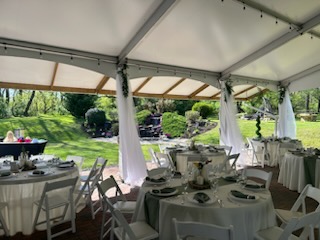
If you're using our garden arbor area, you could even position it behind the last row so virtual guests can watch the processional and see the full ceremony setup. Give it its own "seat" by marking off the space, the last thing you want is someone accidentally bumping into it during the "I do's."
Here's a game-changing trick: assign someone to adjust the angle slightly once everyone's seated. Start with a wide shot that captures arrivals, then have them subtly shift it for a closer view once the ceremony begins. It's a small touch that makes a huge difference in viewer experience.
Trick #3: Solve the WiFi Problem Before It Solves You
Let's be real, outdoor WiFi is often terrible, and cellular data can be spotty depending on your location. But here's where you get to be proactive instead of reactive.
First, test your signal strength in the exact spot where your ceremony will happen. Pull out your phone, check how many bars you have, and run a speed test. If the venue WiFi reaches your ceremony area, that's great, but still have a backup plan.
Your best bet? Bring a mobile hotspot. You can use your phone's hotspot feature (just make sure to upgrade your data plan temporarily for the day), or get a dedicated hotspot device from your carrier. Some couples even coordinate with a tech-savvy friend who has unlimited data to serve as the hotspot hub.
And please, for the love of all that is holy, keep your streaming device plugged into a portable power bank. Livestreaming drains batteries faster than anything else your phone does. You don't want your feed dying halfway through your vows because you forgot to charge overnight.

Trick #4: Get Creative with Camera Placement (Without Getting in the Way)
This is where the magic happens, positioning your camera so virtual guests feel included without creating an eyesore for in-person attendees. After years of hosting ceremonies in our gardens, I've seen setups that work brilliantly and others that... well, didn't.
Here are your best options for discreet, effective camera placement:
Behind the officiant angle: If your officiant is comfortable with it, position a small camera on a tripod behind them (slightly off to one side). This captures your faces during vows and gives virtual guests an intimate perspective. Just make sure it's stable and won't topple into your flower arrangements.
Tucked into your ceremony florals: Use a flexible GorillaPod tripod that can wrap around posts, chairs, or even sturdy branches. You can nestle it right into your arbor decorations or ceremony backdrop, making it almost invisible while capturing beautiful angles.
Multiple device setup via Zoom: Want to give virtual guests options? Set up two devices in different spots and host them in a Zoom meeting. One person can manage switching between camera views during the ceremony, showing different perspectives without any of them being obtrusive.
The key is testing angles beforehand. Walk through your ceremony space, try different positions, and actually watch the footage. What looks good to your eye might not translate well on camera, and vice versa.
Trick #5: Work With Natural Light (Not Against It)
One of the most gorgeous things about outdoor ceremonies is the natural lighting, when you work with it properly. Fight against it, and you'll end up with washed-out footage where no one can see your faces.

Position your camera so the sun isn't directly behind you or shining into the lens. In our wooded areas, this usually means orienting your setup to take advantage of dappled shade rather than full sun. The tree canopy becomes your natural diffuser, creating that soft, romantic lighting that photographs (and livestreams) beautifully.
If you're planning a late afternoon ceremony, embrace golden hour but be strategic about it. That warm, glowing light is stunning, but it can also create lens flare if your camera is facing the wrong direction. Do a lighting test at the same time your ceremony will happen, lighting changes dramatically throughout the day.
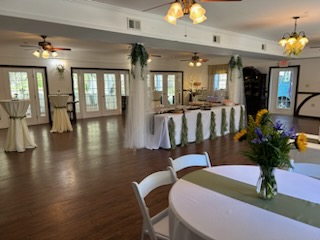
And here's something most people don't think about: if there's an indoor space nearby with windows (like our reception hall), consider positioning your camera just inside a doorway looking out. You get the benefit of stable lighting while still capturing the outdoor scenery. Plus, your device is protected from wind and weather.
The Secret Sixth Trick: Assign a Tech-Savvy Point Person
Okay, I know the title says five tricks, but here's the bonus one that ties everything together: designate someone to handle all of this for you. And I mean someone who's genuinely comfortable with technology: not just your cousin who "knows about phones."
This person should arrive at least an hour early, test all equipment, verify the WiFi or hotspot is working, check audio levels, and troubleshoot any issues before guests arrive. They should have a fully charged backup device, extra power banks, and the login information for whatever streaming platform you're using.
Most importantly, this person should NOT be someone in your wedding party. Your bridesmaids and groomsmen have other responsibilities (mainly supporting you and looking fabulous). This is a dedicated role for a reliable friend or family member who won't be needed for photos or ceremony duties.
Making It All Come Together Seamlessly
Look, I'm not going to lie to you: adding livestreaming to your ceremony does require some planning. But it doesn't have to be complicated or stressful. With these five tricks (okay, six), you can bring your distant loved ones into your special day without compromising the intimate, natural beauty of an outdoor garden ceremony.
The key is preparation. Test everything beforehand. Have backup plans for your backup plans. And then, on the day itself? Let your tech person handle it while you focus on what actually matters: marrying the love of your life in a beautiful setting.
Want to chat more about how to incorporate livestreaming into your ceremony plans? We've helped countless couples figure out the perfect setup for their specific needs. Reach out to us and let's talk about making your vision (and your livestream) absolutely beautiful.


Comments